

FreeEditor toolTools inside Elementor
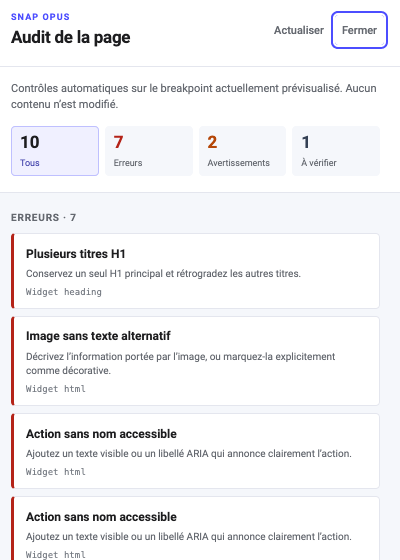
Page Audit
Spot structure, accessibility and layout issues inside Elementor before publishing.
Preview
See this component in action
This tool lives inside the Elementor editor: a real screenshot of the panel, no front-end render to show here.
Concrete use cases
- Pre-delivery check
- Taking over an existing site
- Training an editorial team
Key strengths
- Ranked and explained results
- Direct access to the element in question
- No silent fixes
Easy to use
1. Add the widget
Drag Page Audit from the Elementor panel, like any native widget — no separate editor to learn.
2. Configure it in the panel
The controls that matter are exposed right in the Elementor panel, with a preview that updates live.
3. Publish
The published result matches exactly what you see in the editor, on desktop and on mobile.
Frequently asked questions
Does Page Audit require Elementor Pro?
No. Every Snap Opus widget, including Page Audit, works with the free version of Elementor. Elementor Pro is not a requirement.
Is Page Audit free or part of the Pro plan?
No — Page Audit is included in the Free edition of Snap Opus, at no cost.
Where can I try Page Audit before deciding?
The full demo above is the real widget, running on this local site — not a screenshot or a video. Every control shown in Elementor’s editor is manipulable there.
Is Page Audit responsive and accessible?
Yes. Page Audit is designed mobile-first, with keyboard support and, where relevant, a reduced-motion fallback — the same accessibility bar as the rest of the Snap Opus catalogue.
How is Page Audit different from a native Elementor widget?
Page Audit covers a real use case in the “Tools inside Elementor” family that Elementor’s own widget library does not address out of the box, while staying consistent with Elementor’s editing conventions — no separate builder to learn.
Is support included?
Yes — every Snap Opus licence, Free or Pro, includes access to the documentation and to human support for setup questions.
Ready to try it?
Included in the Free edition — no cost, no time limit.